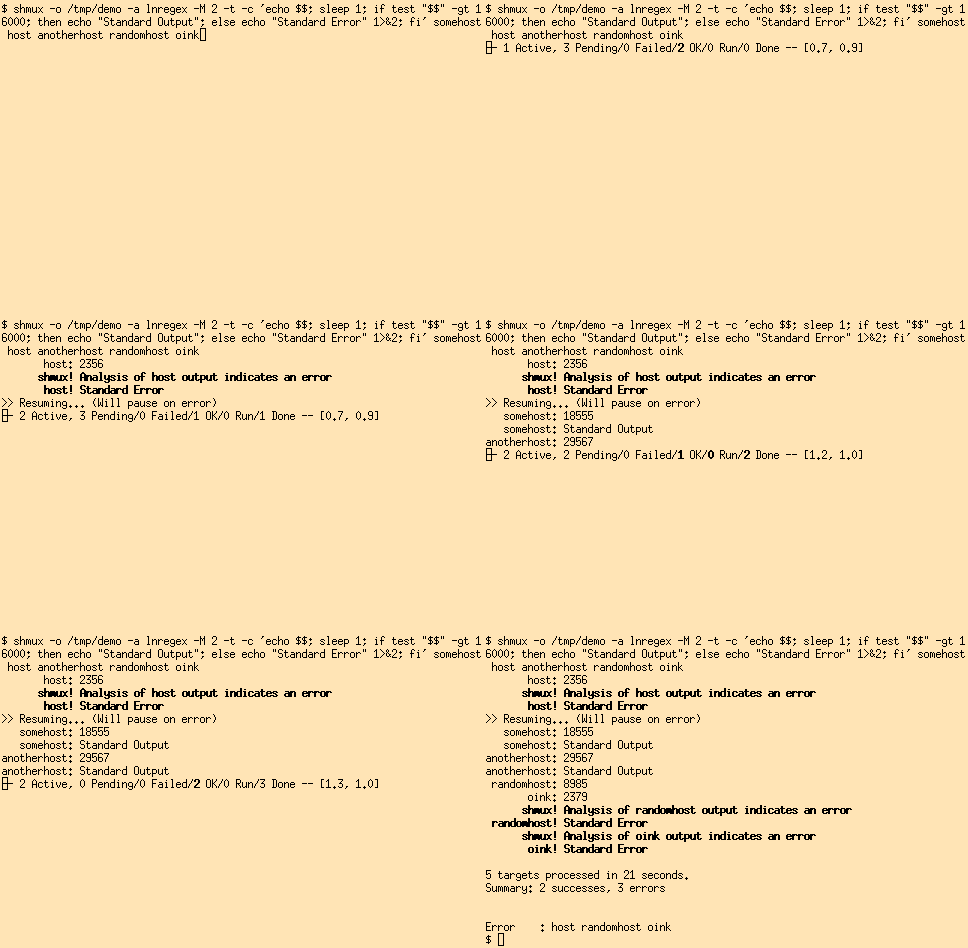
shmux - Shell Multiplexor
SYNOPSIS
shmux [ -h | -V ]
shmux [ -bdmpqQstv ] [ -C timeout ] [ -M max ] [ -r rcmd ]
[ -S mode ] [ -e list ] [ -E list ] [ -a analyzer ] [ -A
condition ] [ -o dir ] [ -P timeout ] [ -T timeout ] -c
command [ - | targets... ]
DESCRIPTION
shmux is program for executing the same command on many
hosts in parallel. For each target, a child process is
spawned by shmux, and a shell on the target obtained one
of the supported methods: rsh, ssh, or sh. The output
produced by the children is received by shmux and either
(optionally) output in turn to the user, and/or written to
files for later processing. The list of targets may
either be specified on the command line or be read from
the standard input.
The default method may be set by using the -r option, and
may be overridden for any target by prefixing the target
name by the method and a colon. Two special methods, ssh1
and ssh2 may be used to select the SSH protocol version 1
or 2, respectively. For the sh method, it is up to the
specified command to contact the target. In order for the
executed command to know which target it is being invoked
for, the SHMUX_TARGET environment variable is set by
shmux.
Before executing the specified command, shmux will option
ally ping each target to ensure that it can be reached,
and/or run a dummy test command to make sure that the tar
get not only is alive, but that it is possible to cleanly
execute a command on it. Both these tests are typically
run with a fairly short timeout to quickly dismiss
unavailable targets rather than waiting for the standard
(longer) network timeout.
After executing the specified command, shmux will option
ally process the output or run a user specified command to
determine whether the command was successful or resulted
in an error. Optionally, the command output is suppressed
for successful targets.
OPTIONS
-h Display a brief help message.
-V Display the version information.
Specify the command to execute on targets.
-C timeout
Specify a timeout for the command being executed on
targets. This should be a number followed by a
time unit. The following are valid time units:
s(econds), m(inutes), h(our), d(ays), w(eeks).
-M max Defines the maximum number of spawned processes.
While there is no real (or hard coded) limitation
for this, the system resources are typically
bounded and this affects shmux in turn. The most
critical resource is the maximum number of open
files a process may have. But one should also con
sider the load imposed on the system by the cre
ation of a (potentially) large number of processes.
-r rcmd
Defines the default method used to run a shell on
targets.
-S mode
This options defines the strategy used by shmux
when spawning children to run the command on tar
gets. If the mode is set to "all", then processes
will be spawned as fast as possible. When set to
"check", processes will be spawned as long as com
mands succeed. Finally, the default mode, "one",
is to spawn only one process at first, and wait for
it to succeed, at which point shmux will switch to
the "check" mode.
-e list
Defines which command exit codes should be consid
ered errors and reported as such. The list should
be a comma separated list of ranges of the form
"x", "x-y", "x-" or "-y" where "x" and "y" are num
bers between 0 and 255.
-E list
Defines which command exit codes should always be
output to the screen. Codes that are considered
errors (see the -e option) are always shown, but by
default, other exit codes are only shown if the -v
option is specified. This allows more flexibility.
-a analyzer
Defines how output should be analyzed by shmux
after the command completes on a target. By
default, nothing is done. Valid options are:
lnregex, lnpcre, regex, pcre and run. This option
requires -o to be used as well.
When the -a option is used, it is also necessary to
configure the chosen analyzer.
For line based regular expressions (lnregex and
lnpcre), the -A option should be specified twice:
once for the standard output and once for the stan
dard error output. In both cases, the argument
should be the name of a file containing a list of
regular expressions, one per line. Each regular
expression must be prefixed by the character '=' or
whether it matches any of the specified regular
expressions. If the first matching regular expres
sion is prefixed by '=', then the command is con
sidered to be successful (so far). Any other
result (e.g. no match, or a match prefixed by '!')
indicates an error condition. The default is to
consider standard output normal, and standard error
output indicative of an error.
For other regular expressions (regex and pcre), the
-A option should be specified twice: once for the
standard output and once for the standard error
output. This option allows defining the expression
to be applied to the output. If the condition
starts with the character If the condition starts
with the character '!' then a failure to match
indicates that the command completed without error.
The second character of the condition should either
be '=' if the regular expression follows or '<' if
the regular expression should be read from the file
which name follows. (The '=' characters may be
omitted.) A condition must be specified for the
standard output, but is optional for standard error
output. The default for the latter is to consider
any output as indicative of an error.
For the run analyzer, the -A must be specified at
least once with the name of a program to run, and
optionally a second time to specify a timeout. The
program will be called after a command completes on
a target unless the command exit code is considered
an error (see -e) with two arguments: the target
name and the directory specified with the -o
option. The output of the program will always be
shown to the user. Exit codes other than 0 indi
cate that the command failed for the particular
target.
-o dir If specified, the directory must already exist and
shmux will place the output and (for normal termi
nations) the exit code of the executed commands in
files under this directory. For each target, the
already exist, so it is recommended that the direc
tory be emtpy. This also means that each target
must be unique. The directory will be created if
it does not exist.
-p Ping targets to verify they are alive before doing
anything. The target names must be unique or bad
things will happen.
-P timeout
Defines the initial target ping timeout in mil
liseconds, see fping(8). (Implies -p.)
-t Before executing the specified command for a tar
get, send a simple "echo" test and verify that the
output is correct. This step goes beyond the sim
ple ping test as it verifies that it is possible to
get a shell on the target. If this option is spec
ified twice (or once when -T is used), output for
failed tests will be displayed to help the user
understand what went wrong.
-T timeout
Defines the test timeout in seconds. (Implies -t.)
-m By default the output is displayed as soon as it is
received. For multi-line outputs, this will typi
cally result in output from several targets being
mixed. This option may be used to keep each target
output separate.
-b Show the bare output from the executed commands
instead of prefixing each line by the corresponding
target name.
-q Used once, this will suppress the output from suc
cessful targets (as defined by the use of options
options -e, -a and -A. If using the run analyzer,
the output of all targets is suppressed. Note that
using this option effectively implies -m in most
cases as failure is ultimately determined upon com
pletion of the command. (Only the lnregex and
lnpcre analyzers are able to determine errors while
the command is running.) When specified twice,
this option allows to completely suppress output
from the command run on targets. This also changes
the default spawn stategy to "all". Using this
option (once or twice) requires using -o.
-Q Suppress the final summary of results.
-s Suppress the progress status line.
-D Display internal debug messages.
EXIT CODES
shmux will optionally report the exit code of the command
it runs for each target. For the sh command, this will be
the same as the command itself, but this is the exception.
For other methods, the exit code reported by shmux really
is the code returned by the program used to spawn command
for that method.
In particular, rsh typically only returns either 0 or 1
while different implementations of ssh have different
behaviours which may include returning the actual exit
code of the remotely executed command or not.
INTERACTIVE MODE
When running, shmux offers a minimal "interactive mode":
it reads commands from the terminal and acts upon them
accordingly. The following commands are currently recog
nized:
q Prevent shmux from spawning any more children, wen
for active children to complete, and then quit.
Q Quit immediately, not waiting for any active chil
dren to terminate. This isn't recommended as the
children are left running. A better alternative is
to press control-C which will be received by shmux
and all running children. These will typically
abort, and shmux terminate in a cleaner fashion.
space Initiate a pause, this prevents shmux from spawning
any more children to do its work. The following
three commands may be used to resume work.
1 This is equivalent to specifying "-S more" on the
command line, but may be used anytime.
return This is equivalent to specifying "-S check" on the
command line, but may be used anytime.
+ This is equivalent to specifying "-S all" on the
command line, but may be used anytime.
p Display the list of pending targets.
r Display the list of targets for which a children
process is currently running.
to run the command.
e Display the list of targets for which the command
completed with error(s).
s Display the list of targets for which the command
completed successfully.
a Display the list of all targets with their status.
k Allows sending a signal to a target.
ENVIRONMENT
shmux will use the following environment variables if set:
SHMUX_RCMD
Specifies the default command used to run a shell
on targets. If the -r option is specified, it
overrides this variable.
SHMUX_SH
Specify the shell to use for targets using the sh
method. (Default is "/bin/sh".)
SHMUX_RSH
Specify an alternative command to "rsh" to use for
targets using the rsh method.
SHMUX_SSH, SHMUX_SSH1, SHMUX_SSH2
Specify an alternative command to "ssh" to use for
targets using the ssh, ssh1 and ssh2 method
(respectively). The variable SHMUX_SSH is used for
all methods, but superseded by the other specific
variables.
SHMUX_SSH_OPTS, SHMUX_SSH1_OPTS, SHMUX_SSH2_OPTS
The variables may be used to specify replace the
default "-xa" options passed to "ssh", "ssh1" and
"ssh2" (respectively). The variable SHMUX_SSH_OPTS
is used for all methods, but superseded by the
other specific variables.
The supplied string is passed as one argument and
is therefore not suitable to pass a complex serie
of options. However, it can be used to suppress
the default, and or add options such as "-4", "-6",
or even "-v". It is recommended to avoid using
these variables in favor of tuning the ssh configu
ration file(s).
Specified the default spawn mode. If the -S option
is specified, it overrides this variable.
SHMUX_ERRORCODES
Specifies the default list of exit codes to be con
sidered errors. If the -e option is specified, it
overrides this variable.
SHMUX_SHOWCODES
Specifies the default list of exit codes to be
always display. If the -E option is specified, it
overrides this variable.
SEE ALSO
fping(8), sh(1), rsh(1), ssh(1), regex(3), pcre(3).
AVAILABILITY
The latest official release of shmux is available on the
web. The home page is http://web.taranis.org/shmux/
AUTHOR
Christophe Kalt <shmux@taranis.org>
BUGS
All rsh and some ssh implementations effectively achieve
user authentication by using privileged ports. Since
there are only 1024 such ports, there is an obvious limi
tation on how many connections may be open using these
programs. To make matters worse such ports may be held
for four minutes (by default) as per the TCP specifica
tion. When using shmux, one can very quickly run out of
privileged ports, at which point failures will start hap
pening.
Man(1) output converted with
man2html